Alternative search engines to Google
If you want to DeGoogle or have better privacy when searching the web you've come to the right place. Today we look at alternatives to Google Search.


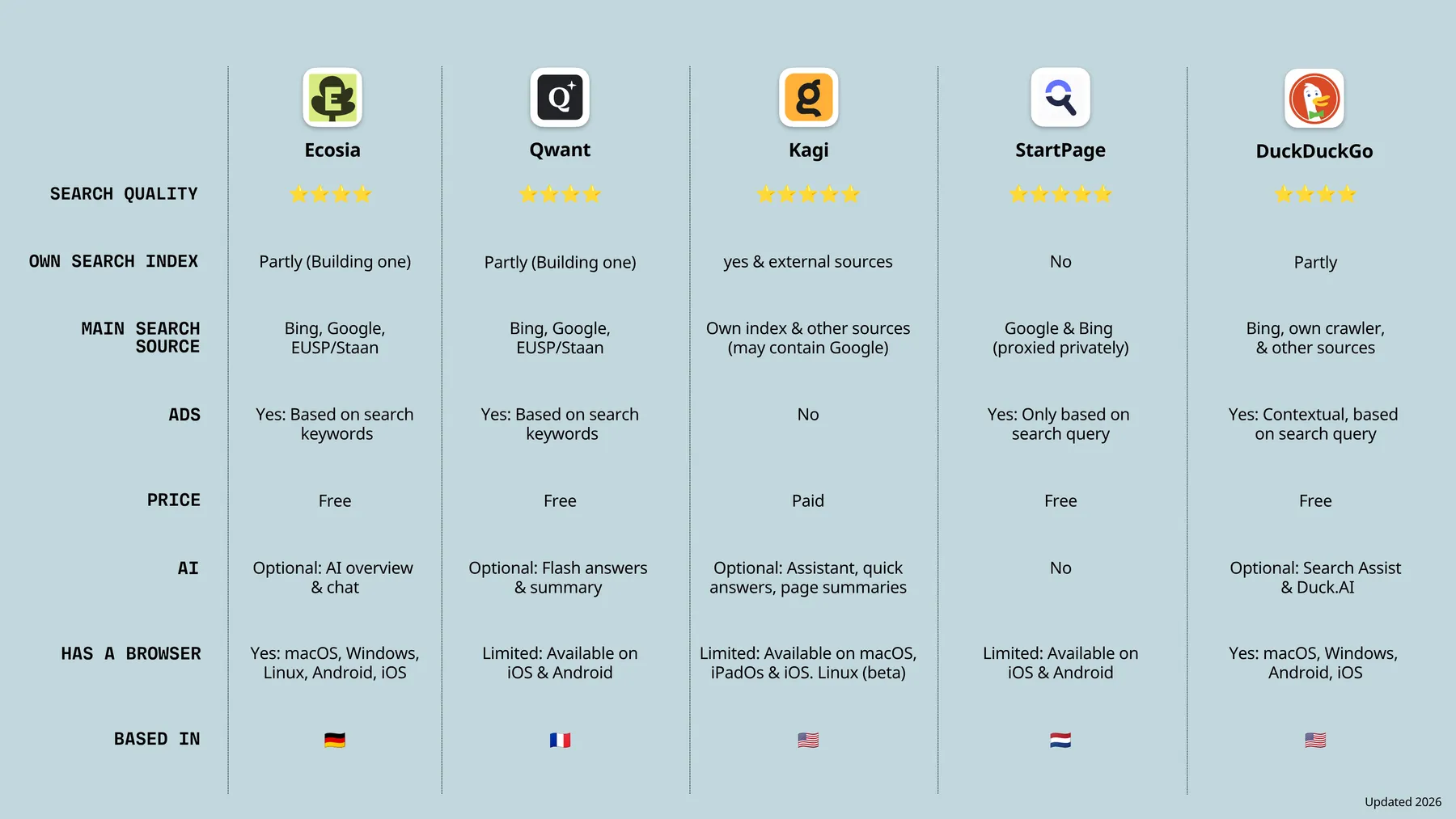
Ecosia, Qwant, Kagi, StartPage and DuckDuckGo are all great alternatives to Google Search.
The main search indexes: Google and Bing
Unfortunately, switching to a Google Search alternative still isn’t as easy as finding a new browser or switching from Gmail to a privacy-focused alternative. This is because there are only really two independent search indexes used when you search the web: Google and Microsoft Bing (luckily this is changing right now, but more on this later).
What this means is that even when you choose an alternative search engine to Google, for example, DuckDuckGo or Ecosia, the results are entirely or partly gotten from Bing. Other search alternatives for example, StartPage, uses Google’s search index but gives Google’s results in an anonymised form.
So while there are different search alternatives that we will look into below, it’s worth noting that these are search alternatives but they still rely on Bing or Google to a certain extent.
It’s worth using a search alternative to Google
The main idea of using a search engine alternative is that you can still get the same great search results but without the invasive tracking and without annoying AI features. Sure, it might still use Google’s search index, but switching to a search alternative is a step in the right direction. And with the current trend to DeGoogle and to opt for privacy-focused alternatives, and the EU’s push for digital sovereignty, there are already projects in development to create alternative search indexes (this is amazing!). For example, Ecosia and Qwant have collaborated to build the European Search Perspective which is a European search index and will further strengthen digital sovereignty with Europe.
Better privacy
The main benefit of using an alternative to Google Search is that you greatly improve your privacy. When using Google Search for searching the web, everything you search, click, or scroll through is linked to your Google account, and if you’re not signed in to your account they still build a highly detailed profile about you based on your browser fingerprint, search history, and IP address.
Google search alternatives No AI
Google, like other tech giants, is excessively integrating AI into all of its products - including search. Now, Google even has AI-powered Search, which is displayed right at the top of the page to encourage people to use it. The release of AI search results and its intelligent AI-powered search box has been met with quite a lot of backlash because users still prefer the old search and search results page - a simple page with a list of results. If you’re wanting a search engine with no AI, check out the recommendations below!
Also interesting: The EU wanted to kill the cookie banner, but then Google called!
Best alternatives to Google Search
- Ecosia: European with a focus on the environment
- Qwant: European with a strong focus on privacy
- DuckDuckGo: Good free search and optional AI
- StartPage: European with Google quality search results but anonymously
- Kagi: Paid for with good search and no ads
Ecosia

Screenshot: Ecosia.
Ecosia is a German-based company best known for offering a browser and search engine that also benefits the planet. 100% of Ecosia’s profits are used for climate action, with the majority of the profit being used to plant trees - to date, the company has planted over two million trees around the world. What’s impressive about Ecosia is that it’s carbon neutral, producing more clean energy than it takes for powering search and AI queries.
Ecosia’s Search uses a hybrid system of its own independent European search index, Bing, and Google. Ecosia does display ads, and does have less focus on data protection compared to DuckDuckGo and StartPage.
AI: Ecosia does offer AI that’s optional to use, and you also have the option to choose AI-free search. This allows you to get search results without AI overviews and AI chat. AI is usually associated with huge data centres and negative effects for the planet but Ecosia has found a way to balance this. As stated on their website, “We generate more clean energy than our AI uses and the model we use is more energy-efficient than mainstream options. Plus, our AI runs almost entirely on a European model provider, in line with our mission to reduce dependence on non-European technology.”
How to get it: Ecosia Search can be used directly in Ecosia Browser, and it has apps available for iOS and Android.
Qwant

Screenshot: Qwant.
Qwant is a French search engine hosted in Europe that describes itself as “The search engine where you are the user, not the product!” Qwant also has a strong focus on user privacy and a strict no-tracking policy: it doesn’t store your search history, use tracking cookies, create user profiles, or sell your data. Qwant does serve ads, but these are only based on what you search for - not a detailed profile.
Qwant search results are a combination of its own independent web crawler, Bing data, and more recently also from the European Search Perspective, a European search index which is a join venture with Ecosia.
AI: Qwant uses AI for searches and it provides AI summaries. If you’d like to make use of its new AI summary feature, you will need to create a Qwant account and login to it.
How to get it: You can get the Qwant mobile app available for download on iOS and Android or you can add Qwant as a browser extension in the browser of your choice.
DuckDuckGo

Screenshot: DuckDuckGo.
DuckDuckGo (DDG) is a popular Google Search and browser alternative known for its focus on privacy. Its search results mostly come from Bing, supplemented with its own web crawler and other sources. In general, search results in DDG are good, and it’s a suitable search engine for everyday use. DuckDuckGo does display ads, but unlike Google, these ads are not targeted and based on an indepth profile of you. DuckDuckGo only displays ads based on what you search for in the moment.
This search alternative allows you to browse the web without being tracked. It blocks 3rd party trackers, targeted advertisements, and cookie banners. Another nice feature is that it allows you to watch YouTube videos without ads and also offers features you’d expect from your browser, like storing passwords - although we’d still recommend using a secure password manager.
AI: What users can also appreciate about DuckDuckGo is that it offers optional AI - giving you the choice to choose if you want AI summaries in search results or not. If you do not want it, simply go to: https://noai.duckduckgo.com/ for an AI-free search experience.
How to get it: You can set DuckDuckGo as your default search engine from within your browser, or you can download the DuckDuckGo Browser application on mobile for Android and iOS. The browser app is also available on desktop for Mac and Windows.
StartPage

Screenshot: StartPage.
StartPage is another great privacy-focused search engine that started in 2006 and is based in the Netherlands. When you search for a query in StartPage, it is sent to Google but in anonymized form. This means that you get Google’s search results but Google can’t track you.
When using StartPage, it never records your search history, protects your IP address, gives unprofiled search results, and allows you to visit sites anonymously. Like DuckDuckGo, this search engine also displays ads, but they are not based on a user profile; instead, the ads displayed are based on the current search query.
AI: StartPage does not show AI summaries or have AI chatbots in search results.
How to get it: StartPage can be set as the default search engine is almost all browsers. It also has a browser application available for iOS and Android.
Kagi

Screenshot: Kagi.
Unlike the other Google Search alternatives mentioned, Kagi is a paid search engine because it does not rely on advertising revenue. When using Kagi, your search results comes from its own crawlers and different external sources - including Bing and Google. Kagi is not a fully independent index but it’s not ‘just another Bing frontend’.
Because it’s a paid service, it’s ad-free, blocks trackers, and allows you to explore the web without Big Tech surveillance.
What makes Kagi standout to other search engines is that it lets you customize the websites you’d like to be boosted or downranked in your search results. For example, if you’re annoyed by the increased Reddit results showing in Google search, in Kagi you can completely remove these from search results.
AI: AI summaries are completely optional in Kagi. If you want an AI summary in your search result, you just have to click the “Quick answer” or end your search result with a “?”. Another nice feature is that this search engine allows you to exclude AI-generated images in search results.
Pricing: Kagi offers a free trial which gives you 100 searches, after that you can subscribe to its starter plan for $5 per month offering 300 searches per month. If you need more it also has higher unlimited search plans like Professional for $10 per month.
How to get it: Kagi can be set as the default search engine in the browser of your choice. It also has a search apps available for download on iOS and Android.
In 2026, you have choice!
Now that you know there are Google Search alternatives available, you might feel like one alone doesn’t meet all your needs. We have good news: you can use multiple browsers and search engines! When it comes to choosing a Google Search alternative, everyone has their preferences and opinions - you can see what people on Reddit say. But ultimately, it all comes down to personal preference and what you use it for.
By using any one of the search alternative to Google mentioned above, you’ll be taking a further step in distancing yourself from the tech giant, boosting your privacy, and supporting smaller competitors.
